unit 3
1. Explain the concept of distributed systems with suitable examples.
Answer:
A distributed system is a collection of independent computers that work together as a single system. These computers are connected through a network and coordinate with each other to achieve a common goal. To the user, it appears as one system, but internally many machines are involved.
In a distributed system:
-
Multiple machines (nodes) communicate over a network.
-
Each node has its own memory and processor.
-
There is no shared memory.
-
Coordination happens using message passing.
-
Failure of one node does not stop the entire system (if designed properly).
Key characteristics:
-
Scalability: System can handle more users by adding more machines.
-
Fault tolerance: If one machine fails, others continue working.
-
Concurrency: Multiple users can access the system at the same time.
-
Transparency: User does not know that multiple machines are involved.
Example 1: Google Search
Google
When you search something on Google, your request is processed by thousands of servers across the world. The data is stored in multiple data centers. The system divides the work among many machines and combines the results before showing them to you. You see one search result page, but internally many servers worked together.
Example 3: Banking ATM Network
Banks use distributed systems where account information is stored in centralized databases but accessed by multiple ATMs and branches. When you withdraw money from an ATM in another city, it communicates with the central server to update your account balance.
Example 4: Distributed Databases
Apache Cassandra
In distributed databases like Apache Cassandra, data is stored across multiple servers. If one server goes down, data is still available from other servers.
2. Discuss different types of transparencies in distributed systems.
Answer:
Transparency in distributed systems means hiding the complexity of multiple machines from users so that the system appears as a single unit.
Types of transparencies:
-
Access transparency
User accesses local and remote resources in the same way. For example, opening a file stored on another server feels same as opening a local file. -
Location transparency
User does not know where the resource is physically located. For example, in Google, users do not know which server processes their request. -
Replication transparency
Multiple copies of data exist, but user sees only one. In Apache Cassandra, data is stored on many servers but appears as single database. -
Failure transparency
System continues working even if some components fail. User may not notice server failure. -
Concurrency transparency
Multiple users can access shared data at the same time without affecting each other. -
Scalability transparency
System can expand by adding more machines without changing user operations.
3. Explain middleware and its role in distributed computing environments.
Answer:
Middleware is a software layer that sits between the operating system and distributed applications. It acts as a bridge that helps different applications and systems communicate with each other in a distributed environment.
In distributed systems, machines may use different hardware, operating systems, or programming languages. Middleware hides this complexity and provides a common communication platform.
Role of middleware:
-
Communication management
It enables message passing between different systems over a network. -
Data exchange and format handling
It converts data into a common format so different systems can understand each other. -
Security services
It provides authentication, authorization, and encryption. -
Transaction management
It ensures reliable execution of distributed transactions. -
Resource management
It manages connections, services, and distributed components.
Example:
Apache Kafka acts as middleware by allowing different applications to send and receive data streams reliably.
Thus, middleware simplifies the development and management of distributed systems by providing common services and hiding network complexity.
4. Describe the Hadoop ecosystem and its importance in Big Data processing.
Answer:
The Hadoop ecosystem is a collection of open source tools designed to store and process large volumes of data in a distributed environment. It is mainly used for Big Data processing where data is too large to be handled by traditional systems.
Core components:
-
Hadoop Distributed File System (HDFS)
Stores large data across multiple machines. Data is divided into blocks and replicated for fault tolerance. -
MapReduce
Processing framework that divides tasks into smaller parts and processes them in parallel on different nodes. -
YARN
Resource management system that manages cluster resources and schedules jobs.
Supporting tools in ecosystem:
-
Apache Hive for SQL like queries on big data.
-
Apache HBase for real time NoSQL database.
-
Apache Spark for fast in memory data processing.
Importance in Big Data:
-
Handles massive structured and unstructured data.
-
Provides scalability by adding more nodes.
-
Ensures fault tolerance through data replication.
-
Cost effective as it runs on commodity hardware.
Thus, the Hadoop ecosystem enables efficient storage and processing of large scale data in distributed systems.
5. Explain HDFS architecture and its core components.
Answer:
HDFS (Hadoop Distributed File System) is the storage system of Hadoop. It is designed to store very large files across multiple machines in a distributed manner and provide high fault tolerance.
Architecture:
HDFS follows master–slave architecture.
Core components:
-
NameNode
Master node that manages metadata. It stores information about file names, block locations, and permissions. It does not store actual data. -
DataNode
Slave nodes that store actual data blocks. Files are divided into blocks and distributed across multiple DataNodes. -
Secondary NameNode
It periodically takes backup of metadata from NameNode to prevent data loss.
Working:
When a file is uploaded, it is divided into blocks and stored in different DataNodes. Blocks are replicated (usually 3 copies) for fault tolerance. If one DataNode fails, data is retrieved from another replica.
Thus, HDFS provides reliable and scalable storage for big data.
6. Discuss Hadoop Web UI and its functionalities.
Answer:
Hadoop Web UI is a web based interface that allows users to monitor and manage Hadoop cluster activities through a browser.
It provides graphical access to different Hadoop components like HDFS and YARN.
Functionalities:
-
HDFS Web UI
Shows file system details such as files, directories, block information, and DataNode status. -
NameNode information
Displays cluster summary, total storage, used storage, live and dead nodes. -
YARN ResourceManager UI
Shows running applications, completed jobs, cluster resources, and node status. -
Job tracking
Users can monitor MapReduce jobs, view logs, and check job progress.
Thus, Hadoop Web UI helps administrators and users monitor cluster health, storage usage, and job execution easily.
7. Compare Hadoop 1, Hadoop 2, and Hadoop 3 architectures.
Answer:
Hadoop 1 architecture
-
Uses HDFS and MapReduce only.
-
Has single NameNode and single JobTracker.
-
No YARN.
-
Limited scalability and single point of failure (NameNode).
Hadoop 2 architecture
-
Introduced YARN for resource management.
-
Separates resource management and processing.
-
Supports multiple processing frameworks like Apache Spark.
-
Improved scalability and high availability for NameNode.
Hadoop 3 architecture
-
Further improved scalability and performance.
-
Supports multiple standby NameNodes for better fault tolerance.
-
Introduced erasure coding to reduce storage cost.
-
Better resource utilization and support for more cluster nodes.
Thus, Hadoop evolved from basic MapReduce architecture to a more scalable and fault tolerant distributed system.
8. Explain HDFS file storage mechanism and fault tolerance
Answer:
HDFS stores files by dividing them into large fixed size blocks (default 128 MB). Each block is stored on different DataNodes in the cluster.
File storage mechanism:
-
When a file is uploaded, it is split into blocks.
-
NameNode records metadata like file name and block locations.
-
Blocks are distributed across multiple DataNodes.
-
Client reads data by contacting NameNode for block location and then accessing DataNode directly.
Fault tolerance:
-
Each block is replicated (default replication factor is 3).
-
Replicas are stored on different DataNodes.
-
If one DataNode fails, data is accessed from another replica.
-
NameNode monitors DataNodes using heartbeat signals.
Thus, HDFS ensures reliable storage and continuous availability even if some nodes fail.
9. Describe important HDFS shell commands with examples.
Answer:
HDFS shell commands are used to interact with HDFS through command line.
Important commands:
-
ls
Used to list files and directories.
Example: hdfs dfs -ls /user/data -
mkdir
Creates a directory in HDFS.
Example: hdfs dfs -mkdir /user/input -
put
Uploads file from local system to HDFS.
Example: hdfs dfs -put file.txt /user/input -
get
Downloads file from HDFS to local system.
Example: hdfs dfs -get /user/input/file.txt -
rm
Deletes file or directory.
Example: hdfs dfs -rm /user/input/file.txt -
cat
Displays file content.
Example: hdfs dfs -cat /user/input/file.txt
These commands help manage files stored in HDFS.
10. Explain MapReduce programming model and execution flow.
Answer:
MapReduce is a programming model used in Hadoop for processing large datasets in parallel across multiple machines.
It has two main phases:
-
Map phase
Input data is divided into splits. Mapper processes each split and converts input into key value pairs. -
Reduce phase
Reducer receives grouped key value pairs and performs aggregation or computation to produce final output.
Execution flow:
-
Data is stored in HDFS.
-
Input is divided into splits.
-
Mappers process splits in parallel.
-
Intermediate key value pairs are shuffled and sorted.
-
Reducers process grouped data and generate output.
-
Final result is stored back in HDFS.
Example: Word count
Mapper emits (word, 1) for each word.
Reducer sums values for each word and outputs total count.
Thus, MapReduce enables distributed parallel processing of large data efficiently.
11. Discuss the role of Pig in Big Data processing.
Answer:
Pig is a high level data processing platform used in Hadoop for analyzing large datasets. It uses a scripting language called Pig Latin to write data transformation programs easily instead of writing complex MapReduce code.
Role of Pig in Big Data:
-
Simplifies data processing
Users can write simple scripts instead of Java based MapReduce programs. -
Handles large datasets
Pig runs on Hadoop and processes data stored in HDFS. -
Supports data transformation
Used for filtering, grouping, joining, and sorting large datasets. -
Extensible
Users can write custom functions (UDFs) in Java, Python etc.
Example:
Apache Pig converts Pig Latin scripts into MapReduce jobs and executes them on Hadoop cluster.
Thus, Pig makes Big Data processing easier and faster for developers.
12. Explain Pig architecture and interfaces.
Answer:
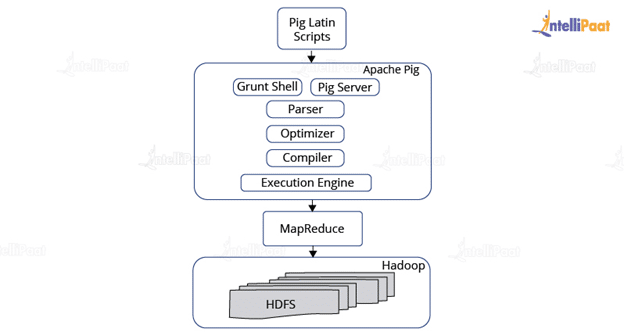
Pig architecture consists of two main parts: Pig Latin and execution engine.
Architecture:
-
Pig Latin
High level scripting language used to write data analysis programs. -
Parser
Checks syntax and converts script into logical plan. -
Optimizer
Optimizes logical plan for better performance. -
Compiler
Converts optimized plan into MapReduce jobs. -
Execution Engine
Executes jobs on Hadoop and stores output in HDFS.
Interfaces of Pig:
-
Grunt shell
Interactive command line interface to run Pig commands. -
Script mode
Users can write Pig scripts in a file and execute them. -
Embedded mode
Pig can be embedded in Java programs.
Thus, Pig architecture translates high level scripts into distributed processing tasks in Hadoop environment.
13. Describe Pig Latin language features and queries.
Answer:
Pig Latin is a high level data flow language used in Apache Pig for processing large datasets in Hadoop.
Language features:
-
Data flow language
Pig Latin describes how data moves and transforms step by step. -
High level abstraction
No need to write complex MapReduce code. -
Schema support
Allows defining structure of data. -
Extensible
Supports user defined functions (UDFs). -
Lazy evaluation
Execution starts only when result is required.
Common queries:
-
LOAD
Used to load data from HDFS.
Example: A = LOAD 'data.txt' USING PigStorage(',') AS (name, age); -
FILTER
Selects records based on condition.
Example: B = FILTER A BY age > 18; -
GROUP
Groups data by a field.
Example: C = GROUP A BY age; -
JOIN
Combines two datasets.
Example: D = JOIN A BY id, B BY id; -
STORE
Stores result into HDFS.
Example: STORE B INTO 'output';
Thus, Pig Latin provides simple syntax for large scale data processing.
14. Explain data types supported by Pig Latin.
Answer:
Pig Latin supports simple and complex data types.
Simple data types:
-
int – Integer values
-
long – Large integer values
-
float – Decimal numbers
-
double – Large decimal numbers
-
chararray – String values
-
bytearray – Raw data bytes
-
boolean – True or false
Complex data types:
-
Tuple
Ordered set of fields. Example: (1, 'John', 25) -
Bag
Collection of tuples. Example: -
Map
Key value pairs. Example: [name#'John', age#25]
Thus, Pig Latin supports both primitive and nested data types for handling structured and semi structured data.
15. Discuss Pig Grunt shell and its usage.
Answer:
Grunt shell is the interactive command line interface of Apache Pig. It allows users to execute Pig Latin commands directly without writing a separate script file.
Usage of Grunt shell:
-
Interactive execution
Users can type Pig Latin statements one by one and see results immediately. -
Debugging
Helps in testing queries and checking intermediate outputs. -
Running scripts
Pig scripts can also be executed from Grunt using the run command. -
File operations
Users can load data from HDFS and store results back to HDFS.
Example usage:
grunt> A = LOAD 'data.txt' USING PigStorage(',');
grunt> DUMP A;
Thus, Grunt shell provides an easy way to develop and test Pig programs interactively.
16. Explain Hive architecture with a neat diagram
Answer:
Hive is a data warehouse tool built on Hadoop that allows users to query large datasets using SQL like language called HiveQL.
Main components of Hive architecture:
-
User Interface
Users interact through CLI, Web UI, or JDBC/ODBC. -
Driver
Receives HiveQL query and manages query execution process. -
Compiler
Parses query and converts it into execution plan. -
Optimizer
Optimizes the query plan for better performance. -
Metastore
Stores metadata such as table schema, column names, and data location. -
Execution Engine
Executes query using Hadoop framework like MapReduce or Apache Spark.
Neat diagram (text representation):
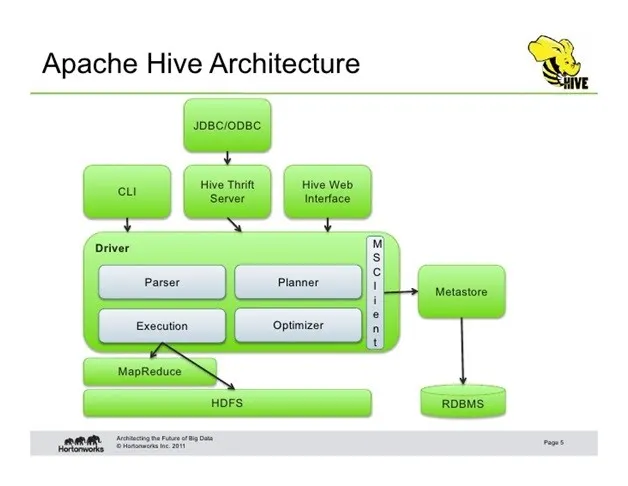
User Interface
↓
Driver
↓
Compiler
↓
Optimizer
↓
Execution Engine
↓
Hadoop
↓
HDFS
Thus, Hive architecture converts SQL like queries into distributed processing tasks on Hadoop.
17. Describe Hive components: UI, MetaStore, Process Engine, and Execution Engine.
Answer:
Hive is a data warehouse tool built on Hadoop that allows SQL like queries on big data.
Main components:
-
User Interface (UI)
It allows users to interact with Hive. Users can submit HiveQL queries through CLI, Web UI, or JDBC/ODBC connections. -
MetaStore
It stores metadata information such as table names, column details, data types, and location of data in HDFS. It acts like a catalog for Hive tables. -
Process Engine
It manages the overall query lifecycle. It takes the HiveQL query, analyzes it, creates logical and physical plans, and coordinates execution. -
Execution Engine
It executes the query by converting it into jobs that run on Hadoop using frameworks like MapReduce or Apache Spark. It processes data stored in HDFS and returns results.
Thus, these components work together to process large scale data using SQL like queries.
18. Explain HiveQL query execution process.
Answer:
HiveQL is the query language used in Hive for data analysis.
Query execution process:
-
Query submission
User submits HiveQL query through UI. -
Parsing
Driver parses the query and checks syntax correctness. -
Semantic analysis
System checks table names, columns, and metadata using MetaStore. -
Logical plan generation
Query is converted into logical execution steps. -
Optimization
Optimizer improves query plan for better performance. -
Physical plan generation
Logical plan is converted into MapReduce or Spark jobs. -
Execution
Execution Engine runs jobs on Hadoop cluster and processes data in HDFS. -
Result
Final output is returned to user or stored in HDFS.
Thus, HiveQL queries are converted into distributed processing tasks to handle large datasets efficiently.
19. Discuss data types and table types in Hive.
Answer:
Hive supports different data types and table types to manage structured data on Hadoop.
Data types in Hive:
-
Primitive data types
int, bigint, float, double, boolean, string, char, varchar, date, timestamp.
These store single values like numbers, text, or dates. -
Complex data types
array – ordered list of elements.
map – key value pairs.
struct – group of different fields.
uniontype – holds one of several types.
These are used to store nested and semi structured data.
Table types in Hive:
-
Managed table
Hive manages both metadata and actual data. If table is dropped, data in HDFS is also deleted. -
External table
Hive manages only metadata. Data remains in HDFS even if table is dropped.
Thus, Hive provides flexible data types and table options for large scale data storage.
20. Explain how data is loaded into Hive tables from HDFS.
Answer:
Data is loaded into Hive tables using the LOAD command or by creating tables on existing HDFS data.
Methods:
- Using LOAD DATA command
Syntax:
LOAD DATA INPATH '/path/file.txt' INTO TABLE table_name;
This moves data from HDFS location into Hive managed table directory.
-
Using LOCAL keyword
LOAD DATA LOCAL INPATH 'file.txt' INTO TABLE table_name;
This uploads file from local system to Hive table. -
Creating external table
When creating an external table, location of HDFS data is specified. Hive reads data directly from that location without moving it.
Working process:
-
Data is stored in HDFS.
-
Hive table metadata is stored in MetaStore.
-
When query runs, Hive reads data from HDFS based on table definition.
Thus, Hive loads and accesses data from HDFS by linking table metadata with stored files.